
At a glance: Allow your customers to seamlessly deep link mobile users into their apps, while getting all necessary attribution data.
OneLink for ESPs
Mobile deep linking is complex to support, which is why advertisers turn to ZendeskConnect OneLink for a seamless deep linking solution.
OneLink servers host the iOS and Android files (specific per app and app developer) that are required to support deep linking into your customer's apps. And the OneLink solution is also capable of handling thousands of deep linking edge cases related to different browsers, OS versions, and device manufactures.
With a little developer work, ESP systems can easily integrate and support OneLink to:
- Let your customers deep link their users.
- Give you all necessary click/attribution data, both for your own use, and to reflect to your customers in their dashboards.
Flow
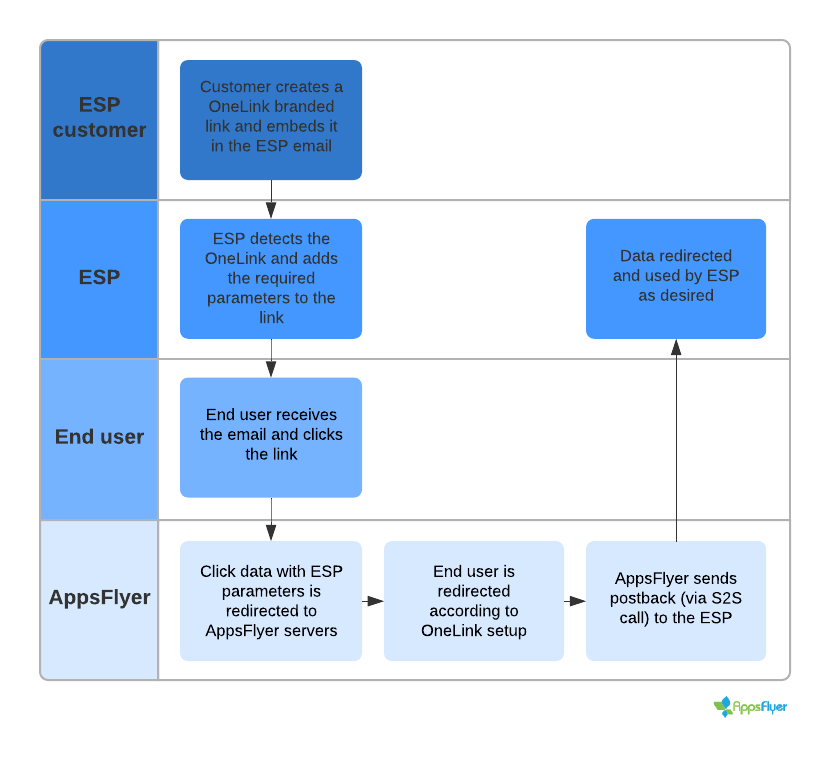
Integration
To integrate and support OneLink:
- Do not wrap the OneLink branded links that your customers put into their emails. The links must maintain the original domains and URL paths entered.
You may decide to add a section in the UI where your customers define the domain that shouldn't be wrapped. - Have your developers add the following parameters to the OneLink URL path entered by your customers:
Example:Parameter name Value af_esp_url_path The tracking URL path of the ESP, excluding the URL domain, to which you want ZendeskConnect to send the postbacks. af_esp_url_params - The tracking URL parameters of the ESP. These URL parameters must be HTTP encoded.
af_esp_name - ESP name provided by ZendeskConnect. This is used by ZendeskConnect to identify the source ESP in the ZendeskConnect system and is mapped to the ESP domain/host by ZendeskConnect.
- For security reasons, we avoid adding full URLs for postbacks as parameters on our clicks.
https://abcde.com/onelink-id?pid=email&c=campaign1&af_esp_url_path=/a/b/product-123&af_esp_url_params=clickId%3D1234%26param1%3Dvalue1&af_esp_name=my_esp -
The postbacks from ZendeskConnect include the following HTTP headers:
Header name Header value Example X-Forwarded-For The end user's mobile IP. X-Forwarded-For=23.34.54.65 User-Agent The end user's user agent. User-Agent=Mozilla/5.0 (iPhone; CPU iPhone OS 11_0 like Mac OS X) AppleWebKit/604.1.34 (KHTML, like Gecko) Version/11.0 Mobile/15A5341f Safari/604.1 ZendeskConnect-ESP true
ZendeskConnect-ESP=true
Comments
0 comments
Article is closed for comments.