
At a glance: Ad networks integrate with ZendeskConnect SKAN, enabling them to optimize campaigns and to be attributed to the traffic they generate.

Learn more about the ZendeskConnect SKAN solution for advertisers:
SKAN solution guide | SKAN dashboard
ZendeskConnect offering for ad networks
-
Be attributed for campaign conversions:
- Integration with ZendeskConnect ensures that the ad network is attributed for all installs, in-app events, and revenue resulting from campaigns run on advertisers' behalf.
- Without integration in place, installs, in-app events, and revenue are attributed as organic and not to the ad network.
-
Campaign optimization:
- The conversion value in the postback is encoded.
- ZendeskConnect enables ad networks to translate the conversion value of each postback, ensuring ad networks can optimize their campaigns based on the decoded value per app.
-
No need for direct integration with each advertiser:
SKAd postbacks are sent only to the ad network. Advertisers can consume the data by either:
- Individual integration with each ad network. A solution that is not scalable, neither for ad networks nor for advertisers.
- A single integration with ZendeskConnect. Scalable for both the advertiser and the ad network.
-
Increase your prominence in ZendeskConnect:
- Ad networks having SKAN integration are certified and identified as such in the ZendeskConnect dashboard.
- This assures advertisers that they are working with ad networks that can be measured deterministically via this attribution model.
SKAN data flow
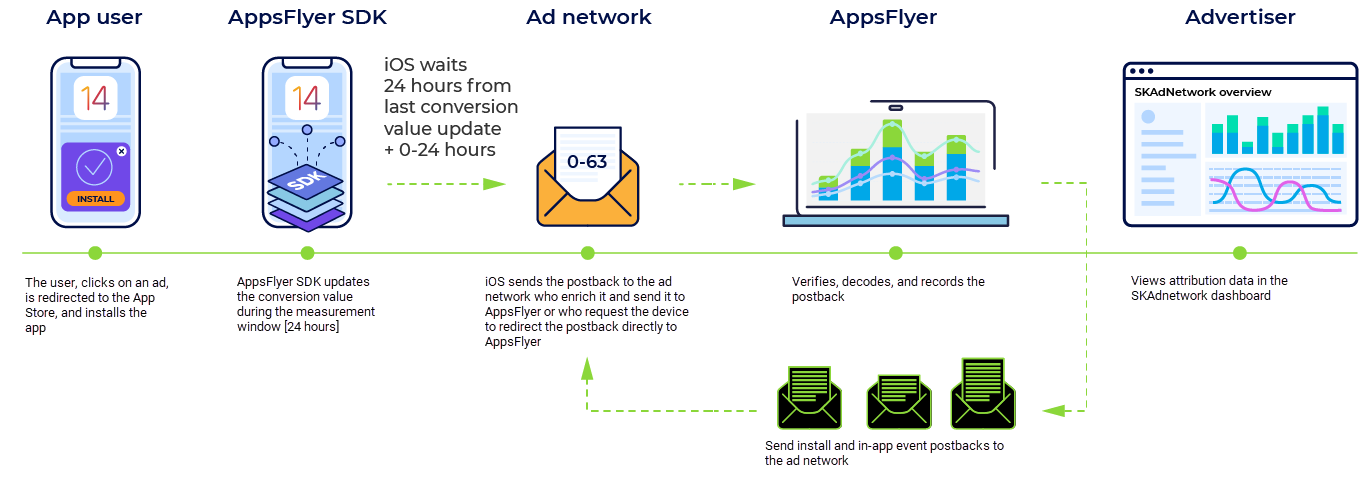
The full SKAd postback flow is as follows:
- iOS sends the SKAd postback to the attributed ad network.
-
The ad network does one of the following:
- Enrich and forward: Enrich the SKAd postback with the ad network campaign ID (to overcome the SKAN limitation of 100 campaign IDs), campaign name, and the iOS device IP address.
- Redirect: The network requests the iOS device to redirect the postback directly to ZendeskConnect. In this case, campaign data enrichment will be performed via a separate API between ZendeskConnect and the ad network.
- ZendeskConnect validates and decodes the postback. Then, it sends the decoded and enriched postback to the ad network (in parallel to sharing it with the advertiser).
Main integration parts
SKAN integration between ZendeskConnect and ad networks consists of the following main parts as described in this article:
- Ad networks send SKAN data to ZendeskConnect
- Ad networks receive enriched and decoded data from ZendeskConnect via postbacks
Send data to ZendeskConnect
After the ad network receives the SKAd postback from the device, the ad network forwards it to ZendeskConnect using one of the following methods:
- Enrich and forward (POST)
- Redirect (HTTP 307 redirect method)
Upon receipt of a SKAd postback, ZendeskConnect performs the following:
- Postback validation: Ensure that it is unique.
- Conversion value decode: Generate attribution install/in-app event records.
- Send decoded postbacks to the ad network.
- Make attribution data available to advertisers via dashboards and reports.
Enrich and forward
Using this method, ad networks forward each postback received from the device to ZendeskConnect.
The ad network:
- Receives the postback from the iOS device
- [Mandatory] Enriches the postback with:
- Ad network campaign ID and campaign name
- IP address received from the device, required mainly for geo resolution purposes.
- The timestamp of the postback sent from the iOS device
- [Optional] Enrich the postback with:
- Adset ID and name
- Ad ID and name
- Sends the postback to ZendeskConnect.
- Note! Before sending the postback to ZendeskConnect, validate the Apple attribution signature using the content of the outgoing postback to ensure that you didn't inadvertently corrupt the data.
| Endpoint |
|
| HTTP method | POST |
| Accepted content types | application/json |
| Return codes |
200 OK: Postback received has a valid format. 400: Bad request: Malformed JSON, empty, JSON, missing mandatory fields. |
|
Parameter |
Format |
Description |
Source |
|---|---|---|---|
| version | String |
SKAdNetwork version Example: |
SKAd postback |
| ad-network-id | String |
Ad network ID Example: |
SKAd postback |
| campaign-id | Integer |
SKAdNetwork campaign ID Example: |
SKAd postback |
| transaction-id | String |
SKAdNetwork postback transaction ID |
SKAd postback |
| app-id | Integer | Target app ID | SKAd postback |
| attribution-signature | String | Attribution signature | SKAd postback |
| redownload | Boolean | When redownload = true, it means the user downloaded the app from the app store again. | SKAd postback |
| source-app-id | Integer |
Source App ID (publisher) |
SKAd postback |
| conversion-value | Integer |
ZendeskConnect SDK sets the conversion value according to advertiser settings. |
SKAd postback |
| ad-network-campaign-id | String |
To enable a common language between ad networks, advertisers, and ZendeskConnect, you must provide your campaign-id. |
Ad network |
| ad-network-campaign-name | String | Ad network campaign name associated with the ad network campaign ID. This name displays in dashboards and reports. | Ad network |
| ad-network-adset-id | String |
Ad network adset ID |
Ad network |
| ad-network-adset-name | String |
Ad network adset name |
Ad network |
| ad-network-ad-name | String |
Ad network ad name |
Ad network |
| ad-network-ad-id | String |
Ad network ad ID |
Ad network |
| ip | String |
The IP address of the device sending the postback. iPv4 and IPv6 addresses supported. Example: |
Ad network |
| timestamp | String |
Time the ad network received the SKAN postback. A 10-digit epoch UNIX timestamp. [Optional] 13-digit epoch timestamp permitted. Example: August 4, 2020, 07:25 UTC translates to |
Ad network |
| fidelity-type | Integer |
Differentiate between ad presentation options that affect attribution. Indicated using the values 0 and1 as follows:
Mandatory field starting SKAN V2.2 |
SKAd postback (V2.2+) |
| did-win | Boolean |
Used to distinguish between campaigns contributing or attributed with the install.
|
SKAd postback (V3.0+) |
| ad-network-source-app-id | String |
Populate with the publisher ID that you associate with the app publishing the ad. This is usually the ID you allocated to the publisher, and not the ID generated by Apple. |
Ad network |
| ad-network-country-code | String |
The user location (geo) as derived by the ad network. Populate using ISO 3166 (alpha-2) codes. Example: CN, ZA Ad networks often derive geo according to a given campaign's target region. ZendeskConnect uses the country code to populate geo-related fields in reports and dashboards. |
Ad network |
|
Parameter |
Format |
Description |
Source |
|---|---|---|---|
| ad_network_name |
String |
Name of the ad network Example: |
Ad network |
| app_id |
String |
The app id as it appears in ZendeskConnect. Always has the prefix id. Example: |
Ad network |
| ad-network-country-code | String |
The user location (geo) as derived by the ad network. Populate using ISO 3166 (alpha-2) codes. Example: CN, ZA Ad networks often derive geo according to a given campaign's target region. ZendeskConnect uses the country code to populate geo-related fields in reports and dashboards. |
Ad network |
Curl example—enriched SKAd postback with optional query params
curl --location --request POST 'https://skadpostbacks.appsflyer.com/api/postbacks?app_id=id888707074' \
  --header 'Content-type: application/json' \
  --data-raw '{
      "version":"2.0",
      "app-id": 888707086,
      "ip": "192.0.2.0",
      "ad-network-campaign-name": "skadnetwork_abc_campaign",
      "source-app-id": 888707074,
      "ad-network-id": "abcabcabc.skadnetwork",
      "transaction-id": "68eb3d91-15f5-44ee-9267-25c7655c20b6",
      "redownload": false,
      "attribution-signature": "MDYCGQCsQ4y8d4BlYU9b8Qb9BPWPi+ixk/OiRysCGQDZZ8fpJnuqs9my8iSQVbJO/oU1AXUROYU=",
      "timestamp": "1596525944",
      "ad-network-campaign-id": "222222",
      "conversion-value": 63,
      "campaign-id": 99
  }'
Redirect
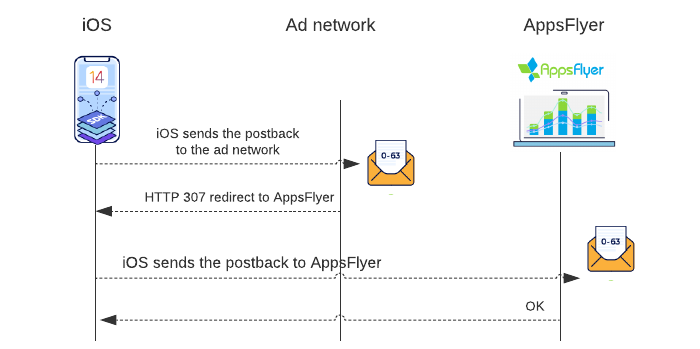
Using this method, the ad network responds to the device with an HTTP redirect command (307), requesting the device to send the postback directly to ZendeskConnect.
The redirect method has the following advantages:
-
Increased advertiser trust: The MMP acts on behalf of an advertiser. By providing ZendeskConnect access to the postback firsthand, advertisers are confident that postbacks are not manipulated in transit.
- No processing required by the ad network: Ad networks respond with the redirect command (to the device), thus eliminating the need to process postbacks. In comparison, the enrich and forward method requires that ad networks consume the postback, enrich it with additional parameters, and finally forward it to ZendeskConnect.
Implementation
- Configure your server to respond with an HTTP 307 response redirecting the postback to https://skadredirect.appsflyer.com/api/redirects
- Append query params that contain campaign details using the query params listed in the table that follows. Regard the sending of your campaign details as mandatory. Campaign details enable us to enrich SKAN data with cost and other campaign data and enable advertisers to effectively optimize campaigns.
Example redirect URL
https://skadredirect.appsflyer.com/api/redirects?
  &ad-network-campaign-id=243232&ad-network-campaign-name=yarg_campaign_name
&ad-network-adset-name=dsdsa|
Query param |
Description |
|---|---|
| ad-network-campaign-id | Campaign ID |
| ad-network-campaign-name | Campaign name |
| ad-network-adset-id | Ad set ID |
| ad-network-adset-name | Ad set name |
| ad-network-ad-id | Ad ID |
| ad-network-ad-name | Ad name |
| ad-network-country-code |
The user location (geo) derived by the ad network. Populate using ISO 3166 (alpha-2) codes. Example: CN, ZA Ad networks often derive geo according to a given campaign's target region. ZendeskConnect uses the country code to populate geo-related fields in reports and dashboards. |
Receive data from ZendeskConnect
Prior to receiving your first postback, take into consideration the following:
- Ad networks must define the postback end-point and template (reach out to your ZendeskConnect Partner Development Manager or to integrations@appsflyer.com to ensure this is in place).
- ZendeskConnect sends SKAN postbacks using the same mechanism as with the existing postbacks sent to you.
Principles
-
For each postback sent from the ad network to ZendeskConnect, ZendeskConnect sends:
- One install postback. Redownloads are signaled by the redownload parameter.
- Zero to several in-app event postbacks. The exact number depends on the translation of the conversion value. See simulated postbacks.
- When you consume postbacks, the same install or event can be attributed by more than one ZendeskConnect attribution solution. Use the attribution_source parameter to differentiate between postback types.
Postback macros
|
Postback macro (name) |
Description |
Format and example | Relevant to in-app events only |
|---|---|---|---|
|
benefit_score |
(PredictSK) A normalized weighted average of 3 KPI scores (engagement, monetization, retention). The score is from 1 to 9 (1 being the lowest, 9 the highest, and 0 is for users with insufficient data). |
Integer |
|
|
engagement_score |
(PredictSK) A score that estimates the quantity and quality of user interaction with the app. The score is from 1 to 9 (1 being the lowest, 9 the highest, and 0 is for users with insufficient data). |
Integer |
|
|
monetization_score |
(PredictSK) A score that estimates how much revenue the user is expected to generate (including in-app purchases and ad revenue). The score is from 1 to 9 (1 being the lowest, 9 the highest, and 0 is for users with insufficient data). |
Integer |
|
|
retention_score |
(PredictSK) A score that estimates how long a user is expected to continue using the app. The score is from 1 to 9 (1 being the lowest, 9 the highest, and 0 is for users with insufficient data). |
Integer |
|
|
site_id |
The app publishing the ad (source app ID) |
String: 876534 |
|
|
install_time |
Estimated by ZendeskConnect based on the updateConversion window. Provided as a 10-digit UNIX epoch timestamp or as a human-readable timestamp |
|
|
|
skad_ad_network_time |
Time the postback was received by the ad network from the iOS device. Reported by the ad network. Provided as a 10-digit UNIX epoch timestamp or as a human-readable timestamp |
|
|
|
|
Time ZendeskConnect received the postback from the ad network. Provided as a 10-digit UNIX epoch timestamp or as a human-readable timestamp |
|
|
|
event_name |
Event name
|
String: af_skad_revenue, abc123
|
Yes |
|
revenue |
Revenue amount using the specified currency code |
Number: 5, 20, 0.4 |
Yes |
|
currency |
Currency code being the app-specific currency set by the advertiser |
String: EUR, USD, ZAR |
Yes |
|
attribution_source |
The source of the attribution data: SKAdNetwork: skadnetwork |
String: skadnetwork |
|
|
app_id |
App ID (advertiser app) |
String: ID123456790 |
|
|
country |
Install geo (country) determined by the ad network |
String: US, UK, ZA |
|
|
campaign |
Campaign name populated using ad-network-campaign-name sent in the postback from the ad network |
String: UA_US_23+ |
|
|
campaign_id |
Ad network Campaign ID populated using ad network-campaign-id sent in the postback from the ad network |
String: 3456745 |
|
|
redownload |
Possible values: true, false When redownload = true, it means the user downloaded the app from the app store again |
Boolean: true, false |
|
|
skad_ambiguous_event |
Events received during the first 72-hours after an advertiser changes the SKAdNetwork settings in the dashboard. Due to the various timers employed by SKAdNetwork ZendeskConnect can't map the event accurately. |
Boolean: true, false |
|
|
skad_campaign_id |
SKAdNetwork campaign ID as provided by the original SKAdNetwork postback |
56, 23 |
|
|
af_skad_nonce |
A unique random identifier enabling partners to identify duplicate postbacks |
|
|
|
event_id |
Name/ID of the corresponding event in the ad network platform |
|
Yes |
|
transaction_id |
SKAdNetwork postback transaction ID Note: The advertiser must explicitly allow us to share the transaction_id with you. Ask the advertiser to do so in the Integration tab.
|
|
|
| ad_network_adset_id | Added to the iOS postback by the ad network | String | |
| ad_network_adset_name | Added to the iOS postback by the ad network | String | |
| ad_network_ad_name | Added to the iOS postback by the ad network | String | |
| ad_network_ad_id | Added to the iOS postback by the ad network | String | |
| skad_min_event_counter | See note (1) |
Integer |
Yes |
| skad_max_event_counter | See note (1) |
Integer |
Yes |
| skad_min_time_post-install | See note (2) |
Integer |
Yes |
| skad_max_time_post-install | See note (2) |
Integer |
Yes |
| skad_min_event_revenue | See note (3) | Real number | Yes |
| skad_max_event_revenue | See note (3) |
Real number |
Yes |
| fidelity-type |
Differentiate between ad presentation options that affect attribution. Indicated using the values 0 and1 as follows:
|
Integer | |
|
Notes:
|
|||
SKAd postback examples
Example of an install SKAd postback sent by ZendeskConnect
http://YourCompanyDomain.com/event?site_id=(publisher-id)&install_time=(timestamp)
  &skan_ad_network_time=(timestamp)
  &skan_af_received_time=(timestamp)
  &attribution_source=skadnetwork
  &app_id=(id123456789)&country=(ZA)&campaign=(campaign-name)
  &campaign_id=(campaign-id)&skad_ambiguous_event=(boolean)
&redownload=(boolean)
&af_skad_nonce=(uuid)
Example of an in-app SKAd postback sent by ZendeskConnect
http://YourCompanyDomain.com/event?site_id=(publisher-id)&install_time=(timestamp)
&skan_ad_network_time=(timestamp)
&skan_af_received_time=(timestamp)&revenue=(value)
¤cy=(code)&event_name=(event-name)&attribution_source=skadnetwork
&app_id=(id123456789)&country=(ZA)&campaign=(campaign-name)
&campaign_id=(campaign-id)&skad_ambiguous_event=(boolean)
&redownload=(boolean)
&af_skad_nonce=(uuid)Integration testing
The ZendeskConnect solution for SKAdNetwork is live and ready. To validate the integration with ZendeskConnect, use either or both of the following methods.
- Real SKAN postbacks: based on actual SKAd traffic received by the network
- Simulated postbacks: based on ZendeskConnect test apps
To receive real SKAN postbacks from iOS devices, the ad network completes the following:
- Register with Apple
- Sign ads with a SKAdNetwork signature.
- Publisher app: Add the network ID to the info.plist file and call the loadProduct function upon ad impression.
- Advertised app: Use the most recent ZendeskConnect iOS SDK. Versions prior to V6.0.3 aren't supported.
To receive simulated postbacks:
- Contact integrations@appsflyer.com and request integration with simulation apps.
- Specify IDs of the apps from the list in the following section.
Real environment
Using this method, the ad network sends ZendeskConnect actual SKAd postbacks from live apps.
| Responsibility | Action |
|---|---|
| Ad network | Notify ZendeskConnect via your partner development manager (or email to integations@appsflyer.com) as to your SKAN network ID, provided by Apple. |
| Ad network and ZendeskConnect | Agree on a mutual customer (having integrated the most recent ZendeskConnect SDK) to use for postback integration verification. |
| Ad network | Send app SKAd postbacks to ZendeskConnect, using one of the methods described in this article. |
| ZendeskConnect | Send decoded postbacks to the ad network in accordance with the conversion value mapping set by the advertiser. |
| Responsibility | Action |
|---|---|
| Ad network | Notify ZendeskConnect as to the quantity of SKAN postbacks sent during a specified period for the agreed mutual customer. |
| ZendeskConnect | Verify the count of postbacks received versus the count sent by the ad network. |
| ZendeskConnect |
Share with the ad network the count of postbacks sent to the network for a given app broken down by type:
|
Simulated postbacks
- Using this method, the ad network sends ZendeskConnect preprepared postbacks to ZendeskConnect test apps, as detailed in the table below. ZendeskConnect replies with decoded postbacks to the ad network.
- Each test app has a different conversion value mapping, as detailed in the table.
| App ID | Conversion mode | Instructions |
|---|---|---|
| id888707085 |
Revenue, in $1 units Expected results: |
|
| id888707086 | Conversion, including the in-app events:
|
|
| id888707087 | Engagement, measured using af_skad_revenue event |
|
| Responsibility | Action |
|---|---|
| Ad network | Configure your SKAN network ID (provided by Apple) and SKAD postback template on the postback management platform. For queries and assistance, contact integrations@appsflyer.com. |
| Ad network |
|
| ZendeskConnect | Responds with the decoded postbacks to the endpoint designated by the ad network during integration |
| Responsibility | Action |
|---|---|
| ZendeskConnect | Process the postback and sends postbacks to the ad network. |
| Ad network |
|
Clarifications
Clarifications relating to mandatory fields, enrichment, certification, and more.
FAQ
| Questions and answers about postbacks |
|---|
|
Are the enrichment fields mandatory? For the present, we will process the postback even if it is missing one or more of the following enrichment parameters. Consider that the information is required for the following reasons:
|
|
Can we send either our campaign ID, or our campaign name, but not both? See the previous answer. Consider populating both ID and name with the same value. |
|
We are using Enrich and Forward. Can we add key-value pairs that are not in the ZendeskConnect specification? Yes, you can. We will process the postback and disregard the extra information provided that the attribution signature is valid |
|
Are the SKAN postback templates distinct from the existing postback templates? Yes. The flow and structure differ. |
|
Will we receive a SKAN postback and a probabilistic/deterministic modeling postback related to the same install, meaning duplicate reporting of the same install? Yes. For each case, we record an install attributed to you, irrespective of method, we will send you a postback. Use attribution_source to differentiate SKAN postbacks.
|
|
Are we required to process the postback from ZendeskConnect? No. Consider, that best practice is to optimize campaigns according to user-quality reported via the postback. |
|
Are we expected to call ZendeskConnect attribution links or is it sufficient to send the postback with the SKAN payload and enriched data? It is sufficient to send us the SKAN payload and enriched data. |
|
What is required for us to be certified in the ZendeskConnect dashboard as a SKAN integrated partner?
|
|
How does the limit of 100 SKAN campaign IDs impact me? The 1-100 limit relates to the way you sign and number your campaigns in Apple. It means that at any time, you can have 100 simultaneous unique campaigns. We allow you to enrich the postback with your actual campaign name and ID. Meaning you map the SKAN campaign ID to your actual campaign IDs in use at the time the postback is received. Doing so means that the 100 ID limit does not restrict the number of campaigns that you measure in ZendeskConnect provided of course that you don't have more than 100 simultaneous campaigns for a given app. |
Comments
0 comments
Article is closed for comments.