
At a glance: Data Locker for ad networks delivers aggregated performance data to the partner's storage on AWS or GCS.
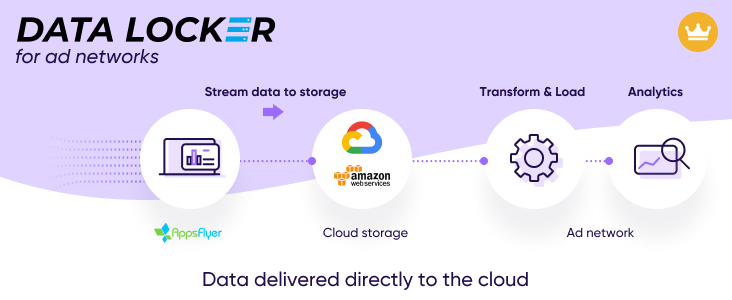
Data Locker for ad networks
Data Locker for Partners delivers selected app performance data to cloud storage. Advertisers set permissions that control the data sharing.
Data Locker features
| Feature | Description |
|---|---|
| Storage options (cloud) |
Storage (bucket) owned by you on:
|
| Multi app support |
Supports data of apps that are integrated with you. The advertiser must give permission per report for you to get the data. |
| Data format options |
|
| Data freshness |
Freshness depends per report type:
|
Reports—for partners
| Report type (topic) | Data access permissions required | Data freshness* | Available to |
|---|---|---|---|
| Aggregated campaign performance |
|
Daily | Ad networks |
| Ad revenue signals for UA ad networks |
|
Daily | Ad networks |
|
* Key to abbreviations Daily:
|
|
||
Data storage architecture
Overview
Data is written to your selected storage option. You can switch from one option to another at any time. The change occurs within hours.
Within the storage, data is organized in a hierarchical folder structure, illustrated in the figure that follows, according to report type, date.
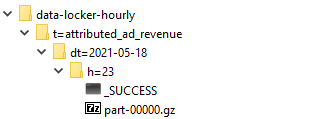
Data of a given report is contained in the hour (h) folders associated with that report.
- The number of hour folders depends on if the report streams hourly or daily.
- Data files consist of compressed GZ files containing Parquet or CSV files.
- Data files consist of columns (fields).
- The column structure is defined per report type.
Folder structure
| Folder | Description |
|---|---|
| data-locker-hourly |
Examples of folder structure based on bucket owner and cloud provider:
|
| t (topic) | Report type relates to the subject matter of the report. |
| dt (date) |
This is the related data date. In most cases, this means the date the event occurred. |
| h (hour) |
The h folders relate to the time ZendeskConnect received the data. For example, install events received between 14:00-15:00 UTC are streamed to the h=14 file. Note! There is a lag, of about 6 hours, between the time the data arrives in ZendeskConnect until the h folder is streamed to Data Locker. For example, the h=14 folder is streamed six hours later at 23:00 UTC. Folder characteristics:
|
| Unified data |
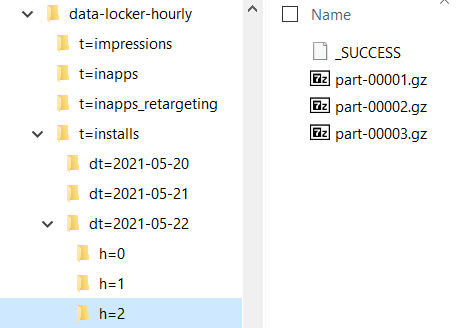
Data for all apps is provided in unified data files. When you load the data, use the row-level app_id field to distinguish between apps. Example of data files are in the h=2 folder
|
| Completion flag |
The last file (completion) flag is set when all of the data for a given h folder has been written.
|
| Zipping |
Files are zipped using gz. After unzipping:
|
| Column sequence |
The sequence of fields in reports is always the same. New fields are added to the right of existing fields. Column (field) definitions are defined per report. Check the relevant report article for the description. |
| Field population considerations |
Blank or empty fields: Some fields are populated with null or are empty. This means that in the context of a given report there is no data to report. Typically null means this field is not populated in the context of a given report and app type. Blank "" means the field is relevant in its context but no data was found to populate it with. Time zone and currency: App-specific time zone and currency settings are disregarded for data provided by Data Locker. As such:
Values with commas: These comas are contained between double quotes `"`, for example,
|

Storage options
- Data is written to a storage owner of your choice as follows: AWS or GCS.
- You can change the storage selection at any time.
- If you change the storage, the following happens:
- We start writing to the newly selected storage within one hour.
- We continue writing to the existing storage during a transition period of 7 days. The transition period expiry time displays in the user interface. Use the transition period to update your data loading processes.
- Changing buckets: If you change storage, data is sent to both for a transition period of 7 days, allowing you to align your data consumption process.
| Advertiser-owned storage (AWS) | |
|---|---|
| Bucket name |
Example: |
| Storage ownership | Ad network |
| Storage platform | AWS or GCS |
| Credentials to access data by you | Not known to ZendeskConnect. Use credentials provided by the storage provider. |
| Data retention | Controlled by you |
| Security |
You control the storage.
|
Notice to security officers
Consider:
- The bucket is for the sole use of ZendeskConnect. There should be no other entity writing to the bucket.
- You can delete data in the bucket 25 hours after we write the data.
- Data we write to the bucket is a copy of data already in our servers. The data continues to be in our servers in accordance with our retention policy.
- For technical reasons, we sometimes need to delete and rewrite the data. For this reason, we require delete and list permissions. Neither list nor delete are a security risk for you. In the case of list, we are the sole entity writing to the bucket. In the case of delete, we can regenerate the data.
Procedures
Set up Data Locker
Use this procedure to set up Data Locker. Changes to settings take effect within 3 hours.
Prerequisite:
Complete one of the following storage procedures:
 To set up Data Locker:
- Log in to your ZendeskConnect partner dashboard.
- Select any app.
- Go to Integration > Data Locker.
- Choose the integration method. Do one of the following:
- Select Your AWS bucket.
- Enter your AWS bucket name. Don't enter the prefix af-datalocker-
- Click Test.
- Verify that no error message displays indicating that the bucket path is invalid.
- Select Your GCS bucket then enter your GCS bucket name and click test.
- Select Your AWS bucket.
- Select file format:
- [Default] Parquet.
- CSV.
- Click Apply.
- Select one or more report types.
- Click Apply.
- Click Save Configuration.
Additional information
Traits and Limitations
| Trait | Remarks |
|---|---|
| Agencies | Not for use by agencies |
| App-specific time zone | Not Applicable |
| App-specific currency | Not supported |
| Size limitations | Not applicable |
| Data freshness | Data is updated according to the specific report data freshness detailed in this article. |
| Historical data |
Not supported |
| Team member access | Team members cannot set up Data Locker. |
Comments
0 comments
Article is closed for comments.