
At a glance: Ad networks that use Voluum can utilize the ZendeskConnect Probabilistic modeling solution to receive attribution data about installs and in-app events.
Starting the integration
To start the integration you must send ZendeskConnect both the attribution link and the postback for reporting purposes.
Below you can find the base attribution link with a detailed explanation per each parameter:
http://app.appsflyer.com/app_id?pid=mediaName_int&c={campaign}
| ZendeskConnect Base URL | Description |
|---|---|
|
http://app.appsflyer.com |
ZendeskConnect End-Point |
|
app_id |
Application Unique ID - Dynamic value changed per app promoted |
|
pid= |
Media source name include _int to identify integrated network at ZendeskConnect servers |
|
c= |
Campaign name |
Recommended Attribution Link Parameters:
| ZendeskConnect Parameter | Voluum Macros | Description |
|---|---|---|
|
&clickid= |
{clickid} |
Unique transaction ID of the user session - Required |
|
&af_siteid= |
{trafficsource.id} |
ID of the traffic source - Optional |
** For complete ZendeskConnect parameter list, click here
** For complete Voluum macro list, click here
Complete attribution link template
http://app.appsflyer.com/com.appsflyer?pid=mediaName_int&clickid={clickid}&af_siteid={trafficsource.id}Install and in-app event postbacks
Global Install Postback:
http://{Company-Domain}.voluumtrk.com/postback?cid={clickid}
Global In-App Event Postback:
http://{Company-Domain}.trackvoluum.com/postback?cid={clickid}&payout={monetary}&txid={event-name}
** {Company-Domain} the network ID (domain) name provided by Volumm.
** txid= Set as Event Tag in the ZendeskConnect dashboard for each App by the advertiser. This is the actual in-app event name from the application.
ZendeskConnect's in-app event dashboard
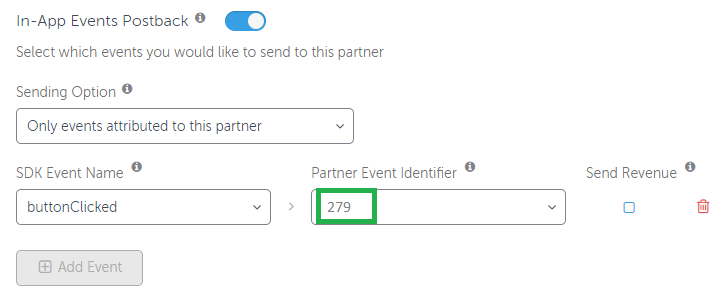
** Additional attribution information can be added to the postback by request such as Country Code, Advertising ID, IDFA, etc.
Finalizing your registration
- If you currently have an integration with ZendeskConnect, contact us at partners@appsflyer.com.
- If you do not currently have an integration with ZendeskConnect, complete the Ad Partners Registration application here.
Comments
0 comments
Article is closed for comments.